

Moonshot AI builds frontier models like Kimi K2 with exceptional long-context capabilities. When combined with Claude Code, it provides a robust experience for multilingual teams and projects requiring extended context windows. This guide follows the official Moonshot documentation. It also shows how you can use Claude Code without Claude Pro.
What is Kimi K2?
Kimi K2 is Moonshot AI's latest large language model (released November 2025) featuring:
- 200K+ Token Context Window: Process extremely large codebases and maintain long conversations without losing context
- Cost-Effective Pricing: Competitive rates compared to other frontier models, with a free tier to get started
- Strong Coding Capabilities: Optimized for programming tasks across multiple languages
Why Use Claude Code with Kimi K2?
- No Claude Pro Required: Point Claude Code at Moonshot's Kimi K2 and pay only for what you use
- Use non-default models: Swap in Kimi K2 instead of the default Claude Opus, Sonnet, or Haiku models.
- Multilingual Teams: Great for teams that work across languages, including Chinese and English.
- Large Codebase Analysis: The extended context window allows analyzing entire codebases at once.
- Bilingual Projects: Ideal for projects with mixed Chinese/English codebases.
Prerequisites
Before you begin, you'll need:
- Claude Code CLI installed on your system
- A Moonshot AI account and API key (register at platform.moonshot.ai)
Step 1: Install Claude Code
If you haven't installed Claude Code yet (full guide at code.claude.com/docs/en/setup):
# macOS and Linux
curl -fsSL https://claude.ai/install.sh | bash

# Or using Homebrew on macOS
brew install --cask claude-code
# Windows PowerShell
irm https://claude.ai/install.ps1 | iex
# Windows CMD
curl -fsSL https://claude.ai/install.cmd -o install.cmd && install.cmd && del install.cmdMark onboarding as complete to skip the first-run prompt:
# Initialize Claude Code config to skip onboarding
node --eval "
    const homeDir = os.homedir();
    const filePath = path.join(homeDir, '.claude.json');
    if (fs.existsSync(filePath)) {
        const content = JSON.parse(fs.readFileSync(filePath, 'utf-8'));
        fs.writeFileSync(filePath,JSON.stringify({ ...content, hasCompletedOnboarding: true }, 2), 'utf-8');
    } else {
        fs.writeFileSync(filePath,JSON.stringify({ hasCompletedOnboarding: true }), null, 'utf-8');
    }"
This sets the hasCompletedOnboarding attribute in .claude.json to true.
If you run into setup issues, check the official Claude Code Setup Guide.
Step 2: Get Your Moonshot AI API Key
- Visit the open platform and create an account
- Navigate to the API Keys section in your dashboard
- Create a new API key

Step 3: Configure Claude Code for Kimi K2
Following the official Moonshot AI documentation, configure Claude Code to use Kimi K2 by setting a few environment variables.
The following configuration sets the Claude Code CLI to use kimi-k2-thinking-turbo model, instead of default models.
Linux and MacOS
# Start the kimi-k2-turbo-preview model on Linux/macOS
export ANTHROPIC_BASE_URL=https://api.moonshot.ai/anthropic
export ANTHROPIC_AUTH_TOKEN=${YOUR_MOONSHOT_API_KEY}
export ANTHROPIC_MODEL=kimi-k2-turbo-preview
export ANTHROPIC_DEFAULT_OPUS_MODEL=kimi-k2-turbo-preview
export ANTHROPIC_DEFAULT_SONNET_MODEL=kimi-k2-turbo-preview
export ANTHROPIC_DEFAULT_HAIKU_MODEL=kimi-k2-turbo-preview
export CLAUDE_CODE_SUBAGENT_MODEL=kimi-k2-turbo-preview
Windows
# Start the kimi-k2-thinking-turbo model on Windows PowerShell
$env:ANTHROPIC_BASE_URL="https://api.moonshot.ai/anthropic"
$env:ANTHROPIC_AUTH_TOKEN="YOUR_MOONSHOT_API_KEY"
$env:ANTHROPIC_MODEL="kimi-k2-thinking-turbo"
$env:ANTHROPIC_DEFAULT_OPUS_MODEL="kimi-k2-thinking-turbo"
$env:ANTHROPIC_DEFAULT_SONNET_MODEL="kimi-k2-thinking-turbo"
$env:ANTHROPIC_DEFAULT_HAIKU_MODEL="kimi-k2-thinking-turbo"
$env:CLAUDE_CODE_SUBAGENT_MODEL="kimi-k2-thinking-turbo"
These exports are temporary. To keep them between sessions:
- macOS/Linux: append the exports to
~/.zshrcor~/.bashrc, thensourcethe file. - Windows PowerShell: use
setxfor persistence, for example:
setx ANTHROPIC_BASE_URL "https://api.moonshot.ai/anthropic"
setx ANTHROPIC_AUTH_TOKEN "YOUR_MOONSHOT_API_KEY"
setx ANTHROPIC_MODEL "kimi-k2-thinking-turbo"
setx ANTHROPIC_DEFAULT_OPUS_MODEL "kimi-k2-thinking-turbo"
setx ANTHROPIC_DEFAULT_SONNET_MODEL "kimi-k2-thinking-turbo"
setx ANTHROPIC_DEFAULT_HAIKU_MODEL "kimi-k2-thinking-turbo"
setx CLAUDE_CODE_SUBAGENT_MODEL "kimi-k2-thinking-turbo"
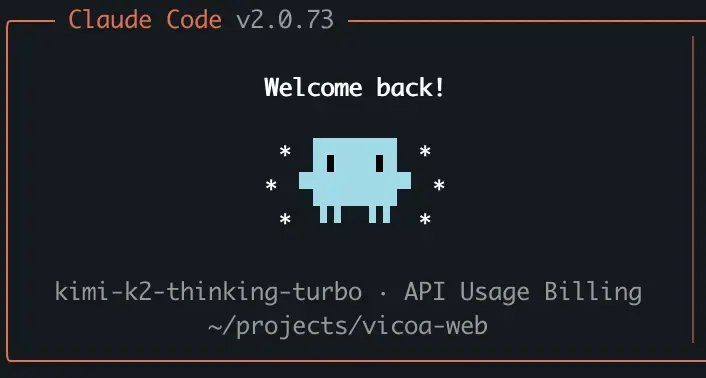
Run claude to start Claude Code. It will automatically connect to the Kimi K2 model. The setting is successful if you see kimi-k2-thinking-turbo like the following image.
Pricing Note: Kimi K2 offers a free tier with limited usage. To prevent abuse, you'll need to add at least $1 in credit to your account. Once your cumulative recharge reaches $5, you'll receive a $5 voucher as a bonus.
Here are the pricing tiers with their rate limits:
| User Level | Cumulative Recharge | Concurrency | RPM | TPM | TPD |
|---|---|---|---|---|---|
| Tier0 | $1 | 1 | 3 | 500,000 | 1,500,000 |
| Tier1 | $10 | 50 | 200 | 2,000,000 | Unlimited |
| Tier2 | $20 | 100 | 500 | 3,000,000 | Unlimited |
| Tier3 | $100 | 200 | 5,000 | 3,000,000 | Unlimited |
| Tier4 | $1,000 | 400 | 5,000 | 4,000,000 | Unlimited |
| Tier5 | $3,000 | 1,000 | 10,000 | 5,000,000 | Unlimited |
Rate limit definitions:
- Concurrency: Maximum number of simultaneous requests being processed
- RPM (Requests Per Minute): Maximum requests you can send in one minute
- TPM (Tokens Per Minute): Maximum tokens you can process in one minute
- TPD (Tokens Per Day): Maximum tokens you can process in one day
Troubleshooting
Common Issues and Solutions
Issue: API Error 429
API Error: 429 {"error":{"message":"Your account <account-id> is suspended due to insufficient balance, please recharge your account or check your plan
and billing details","type":"exceeded_current_quota_error"}}
Solution: Top up the credit with $1.
Frequently Asked Questions
Q: Is Kimi K2 free?
A: Yes, Tier 0 offers free usage with limitations. A minimum $1 credit is required for activation (anti-abuse measure).
Q: Can I use Kimi K2 outside of China?
A: Yes. Kimi K2 is accessible globally.
Q: Does Kimi K2 work well with English code?
A: Yes. Kimi K2 thinking model works for both English and Chinese codes and documentation.
Q: How do I switch back to Claude's default models?
A: Simply unset the environment variables to return to Claude Code's default configuration:
unset ANTHROPIC_BASE_URL \
      ANTHROPIC_AUTH_TOKEN \
      ANTHROPIC_MODEL \
      ANTHROPIC_DEFAULT_OPUS_MODEL \
      ANTHROPIC_DEFAULT_SONNET_MODEL \
      ANTHROPIC_DEFAULT_HAIKU_MODEL \
      CLAUDE_CODE_SUBAGENT_MODEL
Q: How can I use Kimi K2 remotely on my phone?
A: After setting up Claude Code with Kimi K2 using the environment variables above, simply run vicoa in your terminal to start a remote session.
Vicoa provides mobile and remote access to your Claude Code setup with Kimi K2. For setup instructions, visit the Vicoa Getting Started guide.
Benefits include:
- Zero additional configuration — Uses your existing Claude Code + Kimi K2 setup
- Cross-platform access — Code from your phone, tablet, or any device with a browser
- Remote development — Access your development environment from anywhere
- Same interface — Familiar Claude Code experience, optimized for mobile
Conclusion
Integrating Claude Code with Kimi K2 is a powerful way to break free from single-provider constraints while keeping the familiar developer interface. This setup unlocks Moonshot AI's strong coding capabilities.
With just a few environment variables, you can expand what your AI assistant can do — then scale or switch models as your needs evolve. For mobile access, run vicoa to code from anywhere using the same setup.
Give it a try: your next coding session could be powered by Kimi K2, all under the familiar Claude Code interface.
Resources
Need help or have questions? Contact us via email or join our Discord community.
Related Posts
How to Use Claude Code with OpenRouter - Complete Setup Guide 2026
Learn how to combine Claude Code with OpenRouter to access 300+ AI models from 60+ providers through one unified API. Step-by-step configuration guide with free or pay-per-use pricing.
 NT
NT
View Localhost on Mobile: 5 Methods to Test Your Site on Phone
Learn how to view localhost on mobile with 5 proven methods. Step-by-step guides for same-network testing, ngrok, Tailscale, and cloud dev environments. Test your site in minutes.
NT